
The PRXY Report was created to support your reporting needs, both to investors and agents, and for compliance reporting, such as the I-956G Annual Filing.
Where to find and download the PRXY Report
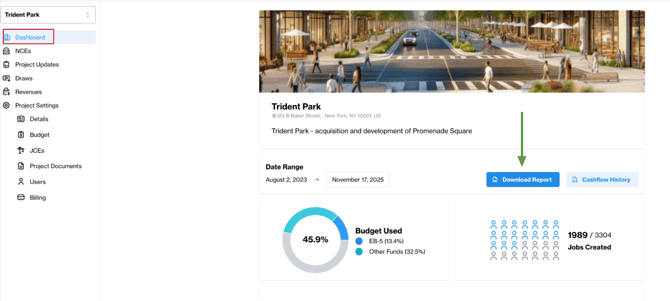
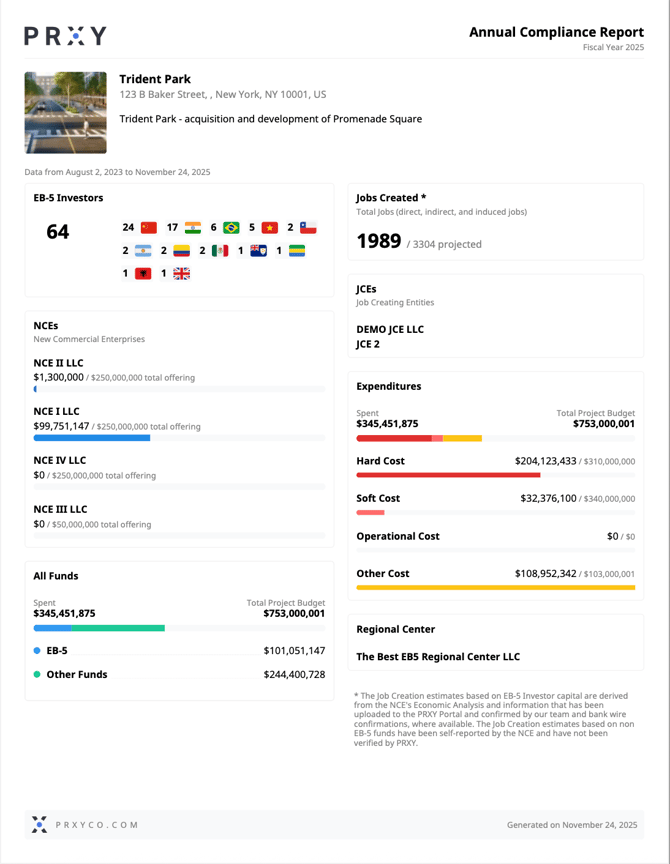
The PRXY Report is available for download in your Dashboard. Simply click ‘Download Report’ for an overview of the project to-date. The report includes essential, high-level information about your project including project details, investor nationality, project and EB-5 spending, estimated job creation, etc.
How to create a robust and accurate Report suitable for compliance reporting
The PRXY Report is a reflection of the data you’ve added to the PRXY Portal. In other words, it will only be suitable for compliance reporting like the I-956G filing if you take the time to add all spending to the PRXY Portal.
Below you’ll find how the information in the portal informs the Report, and where to update it.
|
Project Details |
NCE and offering information lives under the Project Details tab. This is filled out when you first start a project with PRXY. (If any of this information is incorrect, reach out to support@prxyco.com for help.) |
|
NCE Details |
An overview of the NCE (or various NCEs if relevant) exists in the Funds Tab. (If any of this information is incorrect, reach out to support@prxyco.com for help.) |
|
Investor information |
Add investors to the portal under NCEs > Investors. The report will use this information to report on the country of origin of your investors. |
|
Project Spending |
Add all non-EB-5 spending and Bridge Financing to the Drawdowns & Spending Tab. This will automatically update the PRXY Report with a log of expenditures throughout your project. The PRXY report will automatically update to include all expenditures and calculate jobs created. You can upload this information in two ways:
For a full overview of how to upload project spending to PRXY, see How to use the Drawdown & Spending Tab. |
|
EB-5 Draws |
Submit EB-5 Draws in the Cashflow Tab to move money from your NCE to your JCE or other operating account. The PRXY report will automatically update to include all expenditures and calculate jobs created. For a full overview of how to submit EB-5 draws with PRXY see [DRAWS article].) |
What to do if something is missing from your report
First, review the above tabs to make sure that all information is logged. If you still have questions, please reach out to support@prxyco.com.