
This article provides an overview of how billing and payments work at PRXY, including when invoices are issued, how to pay them, and what happens if an invoice is past due.
How Subscription Billing Works
PRXY invoices are issued around the 1st of each month. You’ll receive:
- An email notification when a new invoice is available, sent to the billing contact on file
- An invoice in the ‘Billing’ Tab of the PRXY Portal, available to all Project Admins.
In both cases you can view, download, and pay invoices directly.
Payments and Subscription Types
You may be charged for one of three types of payments:
- One-time Activation Fee per project
- Monthly Subscription, which starts when you add your first investor to the PRXY Portal.
- Yearly Maintenance fee
Your monthly subscription will begin at the beginning of the next month after you add your first investor. For example, if you add an investor on December 8th, you can expect your monthly subscription to begin the first week of January.
Important: if you have multiple Projects with PRXY, please pay onboarding and subscription payments to the PRXY Bank Account specified on your invoice. Please do not send a lump sump to distribute to projects. If you cannot find the specific banking details, please reach out to support@prxyco.com.
Payment Options
You have four options for payment: credit card, debit card, US Bank Account, or ACH Wire Transfer.
Important to keep in mind:
- PRXY does not accept paper checks. Please reach out to support@prxyco.com if you need help with an alternative payment method.
- EB-5 funds may not be used to pay for PRXY services. Please make sure to use an account or payment method that does not hold EB-5 funds.
How to Pay an Invoice
Invoices can be paid using the payment methods available on your invoice. To pay:
- Log into the PRXY Portal or find the email that we sent to your billing contact(s)
- Click the payment or invoice link
- Choose your payment method
- Submit payment using the available options
If you use a third-party payment system (such as Bill.com), invoices can typically be paid once PRXY’s banking details are added to your account. Please reach out to us at support@prxyco.com for bank routing and account numbers.
Saving a Payment Method for future use
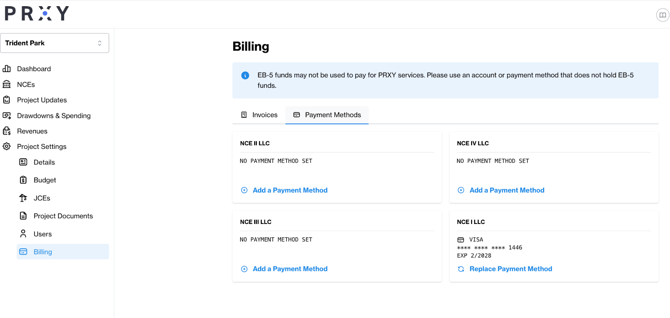
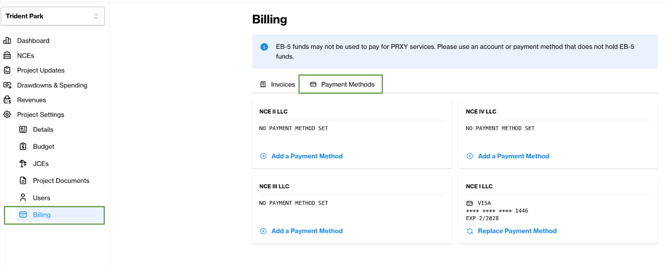
You can set a payment method as your default so that you can use it each time you pay a PRXY invoice. Find this option under the ‘Billing’ Tab, ‘Payment Methods.’
You will have the option to add or replace a payment method for each of your NCEs.
Enrolling in Auto Pay
If you’d like us to automatically charge the payment method you have on file, we can enroll you in Auto Pay. Please reach out to If you’d like us to automatically charge the payment method you have on file, we can enroll you in Auto Pay. Please reach out to support@prxyco.com and we’ll take care of this for you. and we’ll take care of this for you.
Updating the Billing Contact
To update the email listed as your billing contact, please reach out to support@prxyco.com with the updated billing contact.