
This article outlines how to add, manage, and remove investors from the PRXY Portal, Key Tips for investor documents, and how to manage an Investor Redemption or Refund.
How to add an investor to the PRXY Portal
Investors can be added to the PRXY Portal by creating a new profile under the relevant NCE.
Here are the steps:
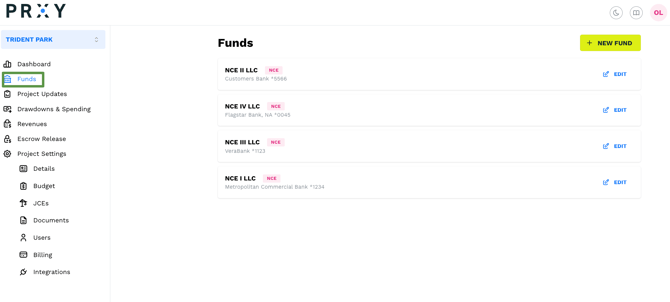
To add a new Investor click on the 'Funds' tab on the left menu. You'll see all of your NCEs in this view. Click the 'Edit' button next to the NCE that has received the Investor's subscription.
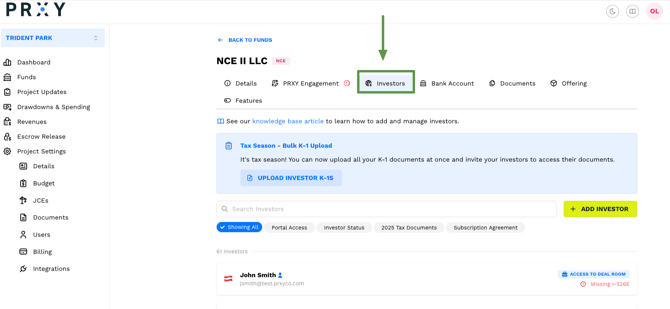
Once in the editable view, you will find the 'Investors' tab on the top of the page underneath the name of your NCE. Click on the 'Investor' tab to add new or view existing Investors.
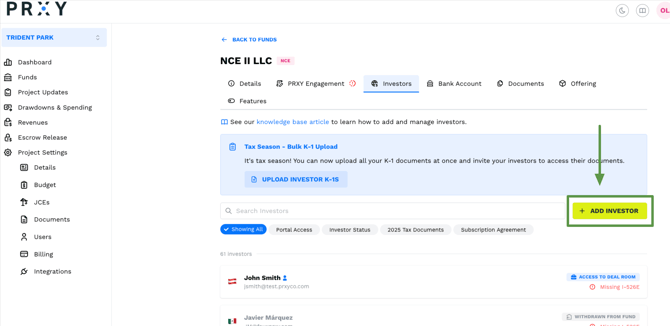
To add a new Investor, hit the '+ New Investor' button on the top right.
You'll be prompted to provide the new Investor's contact information, country of birth, amount of investment, upload their investment and subscription documents, and subscribe them to the project.
Once Investors are added, find key information about each individual here, including their status as a Subscriber to the NCE, whether they have withdrawn from the fund, and any missing documents. Make sure you accurately report the amount of capital invested and monitor investor dashboards for any updates that you need to make.
💡Tip: At this point Investors do not have access to PRXY. See 'Inviting Investors to use PRXY' below for how to send them a login.
Key Investor Documents and Tips
Investor documents must be uploaded to the PRXY Portal prior to moving funds for the first time. We suggest uploading documents from investors as soon as you receive them.
|
Document |
Details |
Tips |
|
Evidence of I-526E filing with USCIS |
This should be the I-797C Receipt Notice of Action, which is a receipt directly from USCIS that confirms they have received the investor’s application or petition. |
In some cases, your EB-5 Documents (specifically PPM) may outline options for alternatives to the I-797C Receipt Notice of Action, such as a letter from the Investor’s Attorney, proof of filing, and proof of payment. This option should be considered with caution – reach out to your attorney to confirm this is outlined sufficiently. |
|
Investor Executed Escrow Acknowledgement |
A signed document confirming that the investor understands and agrees to the terms under which their funds are being held in escrow and the conditions that must be met for those funds to be released. |
Currently, VeraBank does not require an Investor Escrow Agreementn Acknowledgement. |
|
Fully Executed Subscription Agreement |
This is the agreement that outlines the process for investing. It should be signed and dated, and accepted by the NCE/Issuer. |
This should be the full agreement, not just the signature page. Remember, investors will want to see all of their documents, not just signature pages. |
|
Investor Executed NCE LLC Operating or LP Agreement |
This is the agreement that governs the terms of the investors’ investment in the NCE. It should be signed, dated, and countersigned by the Manager or General Partner. |
This should be the full agreement, not just the signature page. Remember, investors will want to see all of their documents, not just signature pages. |
|
Investor Passport |
This should be the passport from their home country and must be current, i.e. not expired. |
PRXY only needs the Bio page, with the investor’s name and photo. We ask for this document to verify the investor’s identity as part of the draw down process. |
|
Investor Executed W-9 or W-8 BEN |
A W-8 BEN is ad domestic, IRS tax document that your investors should fill out certifying that they are a non-US Person or tax payer. Otherwise tax law will require that you withhold a significant amount of their Preferred Returns. |
If the investor lives locally in the US on another kind of visa, or is otherwise a U.S. person for tax purposes, include a W9 instead. Note, this is the case even if the funds are coming from an IRA; a Custodial W-9 is not needed. If you distribute Preferred Returns to the investors without a W-8 BEN on file you could face significant tax penalties. |
|
Any Other Investor Related Documents |
This may include,
|
Some banks ask for some of these documents when processing disbursements from Escrow to the NCE. Keep them on-hand in the investor’s profile for quick access. |
Inviting Investors to use PRXY
If you’d like investors to use the PRXY Portal and follow along with project updates, you can invite them to create a PRXY login. What they can see is outlined here.
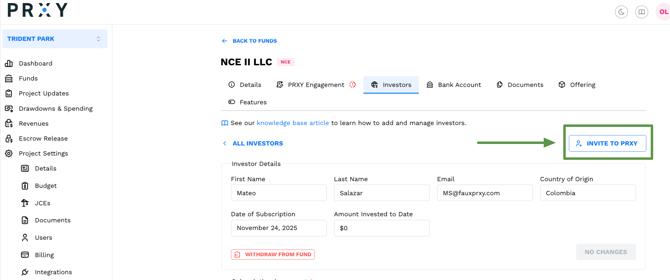
To give them access, click ‘Invite to PRXY’ on their profile. This will send them an email invitation to login for the first time. If you need to re-send the invitation, return to this page to do so.
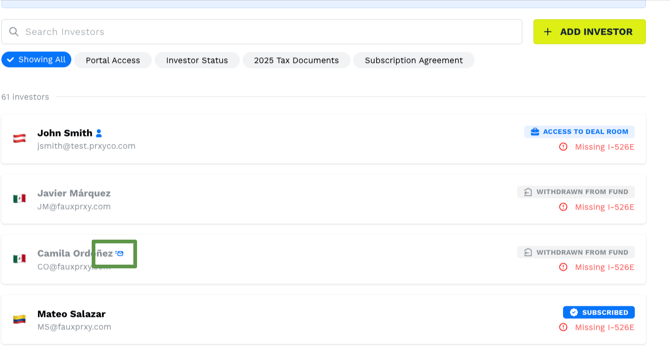
You can also confirm if they've accepted their PRXY invite from the main list -- hover over the icon next to their name for the status.
Withdrawing and Archiving Investors
There may be times that an investor chooses to withdraw from your offering and it’s important that your list of Investors on the portal accurately reflects this.
Withdrawing an Investor
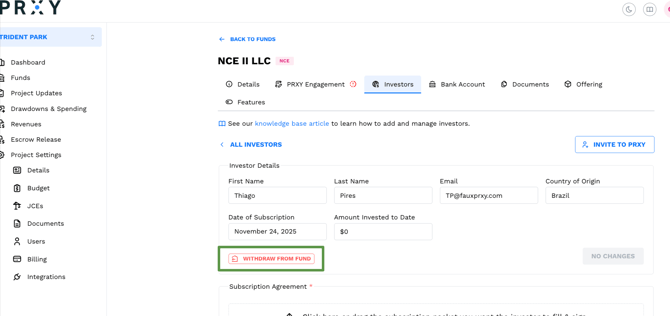
Got to the Funds Tab, choose the NCE, and click ‘Investors.’ Select the Investor you’d like to Withdraw and click ‘Withdraw.’
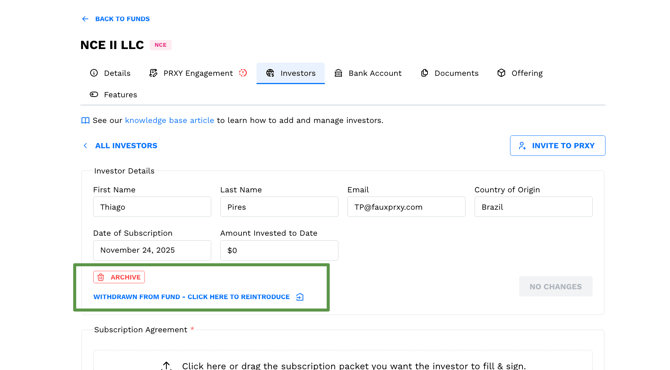
You can always re-introduce them to the offering without repercussion – simply click ‘Withdrawn from fund - re-introduce to offering’ under the ‘Archive’ option.
Archiving an Investor
Investors may also be Archived using this same function
Filtering Investor Profiles
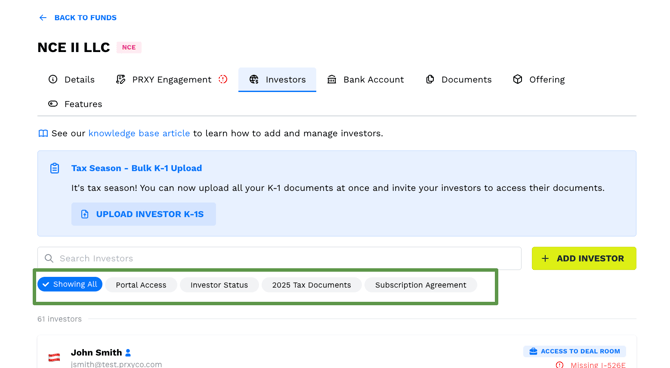
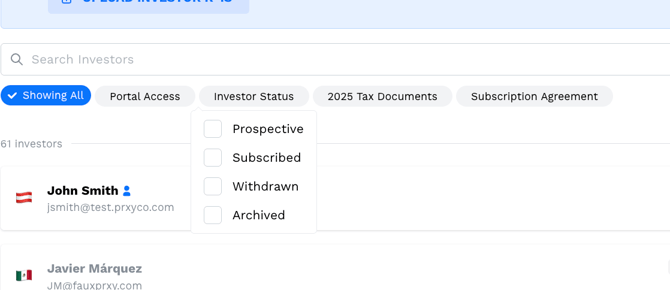
There are various filters you can use to manage your list. A note -- by default, profiles that are Withdrawn and Archived are not included in your Investor view. If you need to see or include them for any reason, simply choose 'Investor Status' to see your options. Note that this will also change the count of investors in your view.
Fixing a duplicate Investor Profile
A duplicate profile can be Withdrawn and Archived using the instructions above to remove them from your offering and view. We recommend updating their name to include ‘DUPLICATE’ or some other naming convention that helps you differentiate between withdrawn and discarded investor profiles.
Refunding Investor funds or Withdrawing an Investor from your Offering
There are a few steps to consider as you withdraw an investor, also called a Redemption.
Firstly, please consider what your investor is looking for.
- A Redemption involves the Company repurchasing the investor’s equity interest in the NCE and withdrawing them from the NCE fund. (This repurchase is typically at a Purchase Price that equals the Investor’s Subscription Proceeds to the Company). See a PRXY Template as an example here.
- A Refund involves the Company returning some or all funds from an investor, but the investor either (i) has not yet been classified as an equity owner in the NCE or (ii) will remain as an equity owner of the Company after the refund. Depending on the specifics of your offering or other factors, a refund may or may not coincide with a withdrawal of the investor from the NCE or a cancellation of their subscription.
A simple way to frame this: Is the investor being removed from the NCE?
- Yes → This requires a Redemption Agreement
- No → This requires a Refund Agreement
|
Scenario |
Steps to take |
|
Withdraw only: The investor has not yet invested in your project |
This is the simplest process as the investor has not yet wired capital and banking support is not needed. Here’s how to manage the investor in the PRXY Portal:
|
|
Refund: Investor is withdrawing and needs capital returned. Money is in Escrow. |
PRXY needs:
Bank needs:
|
|
Refund: Investor is not withdrawing but needs some capital returned. Money is in Escrow. |
PRXY needs:
Bank needs:
|
|
Refund: Investor is not withdrawing but needs some capital returned. Money is in the NCE. |
PRXY needs:
Bank needs:
|
|
Redemption: The investor has invested in your project and the capital is in the NCE or JCE, but not deployed/spent. |
PRXY needs:
Bank needs:
|
|
Redemption: The investor has invested in your project and the capital was drawn down to the JCE and deployed/spent. |
PRXY needs:
Bank needs:
|